If you’ve ever stood in front of a lobby kiosk, fumbling with a phone to pay for a movie ticket or printing a boarding pass, you’ve probably wondered: does this thing take cash or just cards? As someone who’s spent the last 12 years designing, building, and maintaining lobby kiosks for businesses like hospitals, retail chains, and municipal buildings, I get that question all the time. And the short answer is: yes, a lobby kiosk can absolutely accept credit cards and cash. But it’s not a one-size-fits-all solution. There are nuances, tradeoffs, and things you need to consider as a business owner before deciding which payment methods to offer. Let me break this down like I would for a café owner or a hospital administrator who’s weighing whether to invest in kiosks for their lobby. Lobby Kiosk
First, let’s start with the basics: what makes a lobby kiosk different from, say, a food truck POS or a checkout lane at a grocery store? Lobby kiosks are built to be flexible—they sit in high-traffic, often public spaces where users range from a teen grabbing a concert ticket to an elderly visitor at a doctor’s office who only carries cash. The goal is to reduce wait times, cut down on staff tasks, and give users control over their transactions. So payment processing is the backbone of that utility.
When it comes to accepting credit cards, most modern lobby kiosks have no problem with that. The technology here is mature, reliable, and widely standardized. I’ve installed kiosks that process Visa, Mastercard, Amex, Discover, even debit cards with PINs, without a single major failure in years. The key component here is a credit card reader that’s compliant with PCI DSS (Payment Card Industry Data Security Standard)—non-negotiable, because you’re handling sensitive financial data. A lot of cheap, off-the-shelf kiosk parts skip this, but as a supplier, I prioritize compliance because a data breach isn’t just a fine; it’s a death sentence for a business’s trust.
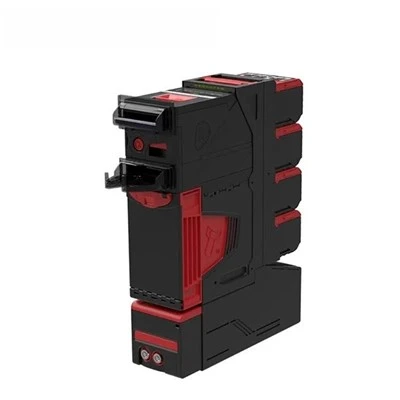
Where things get trickier, and where I get the most questions, is cash acceptance. You might think “cash is cash, a bill acceptor is a bill acceptor,” but that’s not always true for lobby kiosks. Cash handling for kiosks requires more than just sticking a $5 bill in a slot. You need a recycler, usually. A bill recycler doesn’t just take cash and hold it in a compartment—It counts it, verifies its authenticity, and then dispenses it as change when someone pays with a larger bill. If your lobby kiosk is selling a $3 item, and someone puts in a $20, the recycler can hand back a $10 and a $5, no need for a staff member to bring change. That’s a huge win for businesses that don’t want to assign an employee to monitor the kiosk all day.
But here’s the catch: bill recyclers aren’t cheap. A good, reliable one can cost 30 to 40 percent of the total kiosk build. So if you’re a small business with only 2 kiosks, that might not make financial sense. For a large hospital or a mall with 20 kiosks, the savings in staff time from not handling cash adds up fast. I learned this the hard way early in my career. A small local hardware chain came to me looking for lobby kiosks to help with tool rentals. They only had 3 locations, and they kept saying cash was king for their customers. I tried to talk them into adding recyclers, but they balked at the cost. Instead, we went with a simple bill acceptor that didn’t recycle change—It took cash, but only dispensed printed receipts, and users had to go find a staff member for change. Six months later, they called me frustrated: every day, at least 5 people would put in a $100 bill for a $10 rental and walk away because the kiosk couldn’t give change. They ended up retrofitting the kiosks with recyclers, and now wait times at their rental counters are down 70 percent. That experience taught me that cash isn’t just a payment method—it’s a user experience, and you can’t cut corners on it.
Another factor to consider is durability. Lobby kiosks get used hard. They’re out in the open, sometimes in sun that warms them up, sometimes in cold that makes parts stick. A credit card reader will usually hold up for 5 to 7 years if it’s a good quality one, but a bill acceptor? That’s more like 3 to 5 years, because cash can get dirty, crumpled, even torn. I’ve had kiosks in college campuses where students put in folded bills with gum or food residue, and that jams the acceptor. So when you’re spec-ing a kiosk, you have to account for maintenance. If cash is going to be a core payment method in your lobby, you need a service plan that includes monthly checks of the bill acceptor, because even a small jam can take the kiosk offline for a whole shift.
Then there’s the question of fraud. It’s not something most business owners want to think about, but lobby kiosks are targets. For credit cards, the PCI compliance rules go a long way toward preventing fraud—most modern readers are EMV chip-enabled, which is way more secure than swiping. For cash? The fraud risk is smaller, but it’s still there. People sometimes try to pass counterfeit bills, or even slip in a foreign bill when they think no one is looking. That’s why I always recommend adding a counterfeit detector component to the bill acceptor. It’s a small extra cost, but I’ve seen way too many kiosks hold thousands in counterfeit cash because they skipped that step. One of my clients, a municipal transit authority, told me they lost almost $2,000 in a year to counterfeit bills before we added the detector. That’s a lot of money for a small kiosk program.
I also want to talk about user expectation. A few years ago, almost every kiosk only took cards, but now? Consumers expect choices. I do a lot of work with senior living facilities, where many residents don’t use credit or debit cards regularly, or only carry cash. If you put a lobby kiosk in a senior center that only takes cards, you’re effectively locking out 30 to 40 percent of your users. On the flip side, if you put a kiosk in a busy downtown gym where almost everyone uses a contactless card or phone, cash might not be necessary at all. I had a client who runs 12 gyms in urban areas and only took cards on their kiosks. Their wait times for membership check-ins were cut in half, and they never had to worry about change or counterfeits. But another client, a rural clinic where many patients are unbanked, found that adding cash acceptance to their kiosks increased kiosk usage by 45 percent. That’s a huge difference, and it all comes down to who your users are.
Now, let’s talk about integration. A lobby kiosk doesn’t exist in a vacuum. It needs to talk to your existing systems—your POS, your inventory, your reservation software. If you’re accepting both credit and cash, that integration has to work seamlessly. For example, if a patient pays their copay at a hospital kiosk with cash, that payment needs to immediately show up in your billing system. No one wants to have to manually reconcile cash from 20 kiosks at the end of the day. When I build a kiosk, I make sure the payment processor integrates with whatever back-end system the client has, whether it’s a custom software for a small business or a large enterprise ERP. I once had a client that had a very old inventory system and struggled to get the kiosk to sync with it. We ended up building a custom middleware layer that made the integration work without forcing them to replace their entire system, which saved them tens of thousands of dollars.
So, circling back to the original question: Can a lobby kiosk accept credit cards and cash? The answer is a resounding yes. But whether it should depends on a few key things: your user base, the size of your kiosk program, your budget, and your existing operational systems. There’s no one right answer, but there is a right solution for your needs.
As a lobby kiosk supplier, I’ve worked with hundreds of businesses to find that balance. Some need full cash and credit acceptance with recyclers for high-volume locations, some only need credit cards for low-traffic spots, and some need a middle ground where they accept cash but don’t recycle it, just to cover their user base that doesn’t have cards. The worst thing you can do is assume what your customers want or need. Ask them. Watch them use your existing kiosks, if you have them, or talk to your staff about what questions they get about payments. That’s how you build a kiosk that actually works for your lobby.
If you’re thinking about adding lobby kiosks to your space, or if you’re unhappy with your current kiosk’s payment capabilities, I’d love to hear from you. Whether you need a single kiosk for a small café or a hundred for a large retail chain, we can tailor a solution that fits your needs, your budget, and your users. There’s no one-size-fits-all, but there is a solution that’s right for you.
Lobby Kiosk References:
- Payment Card Industry Security Standards Council. Payment Card Industry Data Security Standard (PCI DSS) v4.0, 2022.
- National Retail Federation. 2023 Retail Technology Trends Report, 2023.
- Kiosk Market Research Group. Global Lobby Kiosk Deployment and Payment Processing 2024, 2024.
- American Bankers Association. Unbanked and Underbanked U.S. Households Report, 2022.
- National Health Care for the Homeless Council. Access to Financial Services for Uninsured and Low-Income Patients, 2023.
Hangzhou Smart Future Technology Co., Ltd.
As one of the most professional lobby kiosk manufacturers and suppliers in China, we’re featured by quality products and good service. Please rest assured to wholesale custom made lobby kiosk from our factory. Also, OEM&ODM service is available.
Address: China
E-mail: kelvin.kiosk@smartkiosktech.com
WebSite: https://www.smartkiosktech.com/
